

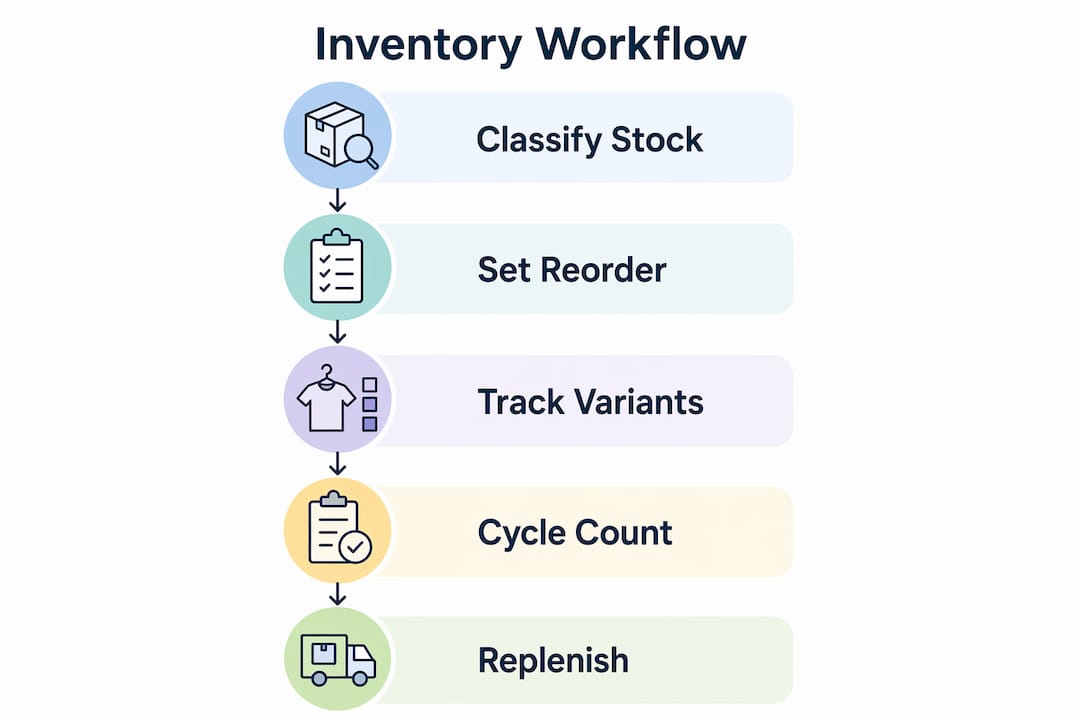
A gift shop inventory management workflow is the structured process of ordering, tracking, counting, replenishing, and reporting stock to maximise accuracy and sales potential. Without a defined workflow, gift shops face chronic stockouts on bestsellers, dead stock on slow movers, and cash tied up in the wrong products. The good news is that three proven techniques, namely ABC classification, variant-level POS tracking, and cycle counting, give you a repeatable system that scales from a single-room boutique to a multi-location operation. This guide covers each technique in sequence, including how to start with a free spreadsheet and when to graduate to dedicated software.
What is a gift shop inventory management workflow and why does it matter?
A gift shop inventory management workflow defines every touchpoint stock has in your business, from the moment a purchase order is raised to the moment a product leaves the shelf. The term “inventory control” is the recognised industry standard for this discipline, and it encompasses receiving, put-away, counting, replenishment, and reporting as a continuous loop rather than a series of disconnected tasks.
The financial case is direct. Poor stock management ties up working capital in products that do not sell while leaving gaps in the lines that do. A well-structured workflow improves stock accuracy, shortens the cash conversion cycle, and reduces the time your team spends firefighting discrepancies. For gift shops in particular, where seasonal spikes around Christmas, Valentine’s Day, and Mother’s Day can triple demand overnight, a documented workflow is the difference between a profitable quarter and a write-off.

The three pillars covered in this guide are ABC classification for prioritisation, POS-integrated variant tracking for product complexity, and cycle counting for ongoing accuracy. Each builds on the last, and together they form a gift store inventory system that works whether you have 200 SKUs or 2,000.
How to classify inventory using ABC method and set reorder points
ABC classification is the single most effective starting point for inventory control in gift shops because it stops you treating a £2 gift tag the same way you treat a £45 candle set. The method divides your catalogue into three tiers based on revenue contribution and sales velocity.
- A-items are your top performers, typically 10 to 20% of SKUs generating 70 to 80% of revenue. These need weekly stock reviews, tight reorder points, and the highest counting frequency.
- B-items sit in the middle, around 30% of SKUs contributing roughly 15 to 20% of revenue. Standard fortnightly reviews and moderate safety stock levels are appropriate here.
- C-items are the long tail, often 50% or more of SKUs but only 5% of revenue. Monthly or quarterly ordering cycles and minimal safety stock keep costs down without risking service levels.
Once you have classified your stock, the reorder point formula gives you a precise trigger for each item. The reorder point formula is: (Average Daily Demand × Supplier Lead Time) + Safety Stock. For example, if a ceramic mug sells 5 units per day, your supplier takes 7 days to deliver, and you want 10 units of safety stock, your reorder point is (5 × 7) + 10 = 45 units. When stock drops to 45, you place the order.
The practical benefit of this formula is that it removes guesswork from replenishment decisions. You no longer need to rely on a manager’s intuition or a rushed stockroom check before a busy weekend. The number tells you exactly when to act. Treating all SKUs equally wastes effort and increases the risk of both stockouts and over-analysis on low-value lines.
Seasonal retailers gain an additional advantage by increasing count frequency for fast-moving A-items during peak periods, reducing labour without sacrificing availability. A gift shop approaching Christmas should recalculate reorder points for its top 20 lines at least four weeks before the peak, using the previous year’s daily demand figures as the baseline.
Pro Tip: Review and recalculate reorder points monthly, not annually. Demand variability in gift retail is high, and a reorder point set in January will be dangerously low by November.
How do POS systems handle stock variants and bundled products?
Gift shops carry inherently complex stock. A single mug design may come in four colours and three sizes, and the same mug may also appear inside a gift basket alongside a tea selection and a candle. Without variant-level SKU tracking, your inventory reports become unreliable within weeks.
Gift shop POS systems must support variant-level tracking for size and colour, as well as kitting functionality to properly decrement inventory when bundles are sold. When a gift basket sells, the POS system should automatically reduce stock for each component: the mug, the tea, and the candle. If the system only decrements the basket as a single SKU, your component stock counts become phantom figures that bear no relation to what is physically on the shelf.
Key features to look for in a gift shop POS system include:
- Variant matrices that let you define attributes such as colour, size, and material at the product level, with individual stock counts per combination
- Kitting or bundling logic that links a bundle SKU to its component SKUs and decrements each on sale
- Real-time channel sync so that online orders and in-store sales draw from the same stock pool, preventing overselling
- Low-stock alerts at the variant level, not just the parent product level, so you know when the blue version of a mug is running low even if the red version is fully stocked
Dedicated POS systems integrate physical and online sales channels to provide unified inventory visibility, which is particularly valuable for gift shops that sell through both a physical location and a platform such as Shopify. Without that sync, a sale made online can create an oversell on a product that was already reserved for an in-store customer. For Shopify users, variant management plugins can extend this functionality further.
Proper product catalogue modelling in POS systems is critical to maintaining accurate inventory and avoiding reporting errors. The time invested in setting up variants and bundles correctly at the outset pays back every single day in reliable stock figures. A step-by-step retail POS workflow can help you structure this setup process from the beginning.
Pro Tip: When configuring bundles in your POS, always test a sale in a sandbox or training mode first. Confirm that each component SKU decrements correctly before going live. One misconfigured bundle can corrupt weeks of stock data.
How does cycle counting improve gift shop stock accuracy?
Cycle counting is the practice of counting a rotating subset of your inventory on a regular schedule rather than shutting down for an annual full stocktake. It is the most practical method of maintaining high accuracy in a live retail environment, and cycle counting with defined frequencies per ABC tier can improve inventory accuracy from approximately 63% to above 98% within six months.
The recommended count schedule by tier is as follows:
| ABC tier | Count frequency | Recount trigger |
|---|---|---|
| A-items | Weekly | Variance above 2 units or 3% |
| B-items | Fortnightly | Variance above 5 units or 5% |
| C-items | Monthly | Variance above 10 units or 10% |
The procedure for each count session should follow four steps:
- Print a blind count sheet that lists the SKU and location but not the expected quantity. Counters record what they physically see, not what the system says. This eliminates confirmation bias and surfaces genuine discrepancies.
- Enter counts into the system on the same day, before any new stock movements occur. Same-day reconciliation prevents the count from becoming stale.
- Trigger a recount for any line that exceeds the variance threshold. A second counter, ideally someone who did not perform the first count, recounts the affected SKUs independently.
- Conduct a root cause review for any confirmed variance. Root cause analysis of inventory variances including receiving errors, misbins, and short picks, with weekly reviews, accelerates sustained accuracy improvements.
Rolling cycle count schedules with matching reconciliation maintain high accuracy and minimise operational disruption. The key discipline is consistency. A count that happens every week without fail, even if it only covers 15 SKUs, delivers far more value than an occasional deep dive that disrupts trading.
Should you start with spreadsheets or jump straight to software?
The honest answer is that a well-structured spreadsheet is a perfectly adequate gift shop stock management tool for operations with fewer than 300 SKUs and a single sales channel. The mistake most shop owners make is either staying on a spreadsheet too long or investing in software before the team has the discipline to use it.
A spreadsheet inventory workflow with Master Inventory, Stock In, and Stock Out tabs, plus conditional formatting for reorder alerts, can be set up in under 20 minutes at zero cost. The reorder alert formula "=IF(J2=0,“OUT”,IF(J2<=K2,“REORDER”,“OK”))` colour-codes each line in red, amber, or green based on current stock versus reorder point. This gives you a visual dashboard that requires no specialist knowledge to read.
The practical approach to building a spreadsheet system is:
- Start with your A-items only. Enter your top 20 SKUs first, validate the formulas, and build the team’s confidence before adding the full catalogue.
- Record every stock movement on the day it happens. A spreadsheet is only as accurate as the discipline behind it. Batch updates at the end of the week destroy its value.
- Add a Discrepancy Log tab where you note any difference between the spreadsheet count and a physical count. This log becomes the evidence base for your first root cause review.
- Set a clear upgrade trigger. When you exceed 300 active SKUs, add a second sales channel, or find that manual updates are taking more than 30 minutes per day, it is time to move to dedicated software.
When you do upgrade, look for a gift shop inventory solution that imports your existing SKU data directly from the spreadsheet via CSV. This avoids re-keying hundreds of product records and reduces the risk of data entry errors during migration. POS integration across channels becomes the natural next step once your catalogue is live in a proper system.
Key takeaways
A disciplined gift shop inventory management workflow built on ABC classification, variant-level POS tracking, and cycle counting is the most reliable path to stock accuracy above 95% and sustainable profitability.
| Point | Details |
|---|---|
| ABC classification first | Divide stock into A, B, and C tiers before setting reorder points or count schedules. |
| Use the reorder point formula | Calculate (Average Daily Demand × Lead Time) + Safety Stock and review monthly. |
| Demand variant-level POS support | Confirm your POS handles size and colour variants and decrements bundle components on sale. |
| Cycle count by tier, not annually | Count A-items weekly, B-items fortnightly, and C-items monthly for sustained accuracy. |
| Spreadsheets work until they do not | Start free with Google Sheets and upgrade to software when SKUs exceed 300 or channels multiply. |
Why most gift shops get inventory wrong before they even start counting
The most common mistake I see is shops jumping straight to counting without first sorting out how their products are modelled in the system. You can count every item in the building twice a week, but if your POS is treating a gift basket as a single unit rather than decrementing its three components, your counts will never reconcile. The workflow has to start upstream, at the point of product setup, not at the stockroom door.
The second thing I would push back on is the idea that you need expensive software to run efficient gift shop processes. I have seen well-run shops with 200 SKUs operating on a Google Sheets template that would put some enterprise systems to shame, purely because the team had the discipline to update it in real time. Conversely, I have seen shops spend thousands on a POS platform and still have 40% stock accuracy because nobody trained the staff on receiving procedures.
Mobile barcode scanning tools that reduce recount hours by 30 to 40% are genuinely worth the investment once you are past the spreadsheet stage. But the discipline of blind counts, same-day reconciliation, and weekly root cause reviews is what actually moves the accuracy needle. Technology accelerates a good process. It cannot substitute for one.
The receiving dock is where most inventory problems are born. Accurate receiving with barcode scanning and bin-location put-away reduces phantom stock and errors at source. If your team is signing off deliveries without scanning each line, you are accepting inaccuracy before the stock even reaches the shelf.
— John
How Ycr supports gift shop inventory workflows

Ycr supplies the POS hardware and software that gift shop owners need to put these workflows into practice. From barcode scanners built for fast, accurate receiving and cycle counting to retail POS software that handles variant matrices, kitting logic, and real-time channel sync, Ycr’s product range covers every stage of the inventory control cycle. With over three decades of experience supplying UK retailers, Ycr offers same-day dispatch and next-day delivery so you are not waiting weeks for the hardware that underpins your operation. Explore the full range at ycr.co.uk to find the right fit for your shop’s size and complexity.
FAQ
What is a gift shop inventory management workflow?
A gift shop inventory management workflow is the end-to-end process of ordering, receiving, tracking, counting, and replenishing stock in a structured, repeatable sequence. It typically combines ABC classification, POS-integrated tracking, and cycle counting to maintain accuracy and support profitability.
How often should a gift shop count its stock?
Count A-items weekly, B-items fortnightly, and C-items monthly using a cycle counting schedule. This tiered approach can improve inventory accuracy from around 63% to above 98% within six months.
Does a gift shop need specialist POS software for inventory?
A gift shop selling variants (sizes, colours) or bundled gift sets needs a POS system with variant-level tracking and kitting logic. Without these features, inventory reports become unreliable because bundle components are not decremented correctly on sale.
When should a gift shop upgrade from spreadsheets to inventory software?
Upgrade when you exceed 300 active SKUs, add a second sales channel, or find that manual updates take more than 30 minutes per day. Below those thresholds, a structured Google Sheets template with conditional formatting is a cost-effective and reliable gift shop inventory solution.
What is the reorder point formula for gift shop stock?
The reorder point formula is (Average Daily Demand × Supplier Lead Time) + Safety Stock. Review and recalculate this figure monthly to account for seasonal demand shifts, particularly in the weeks before Christmas and other peak gifting periods.